What is Digivibe MX® 26 Balance?
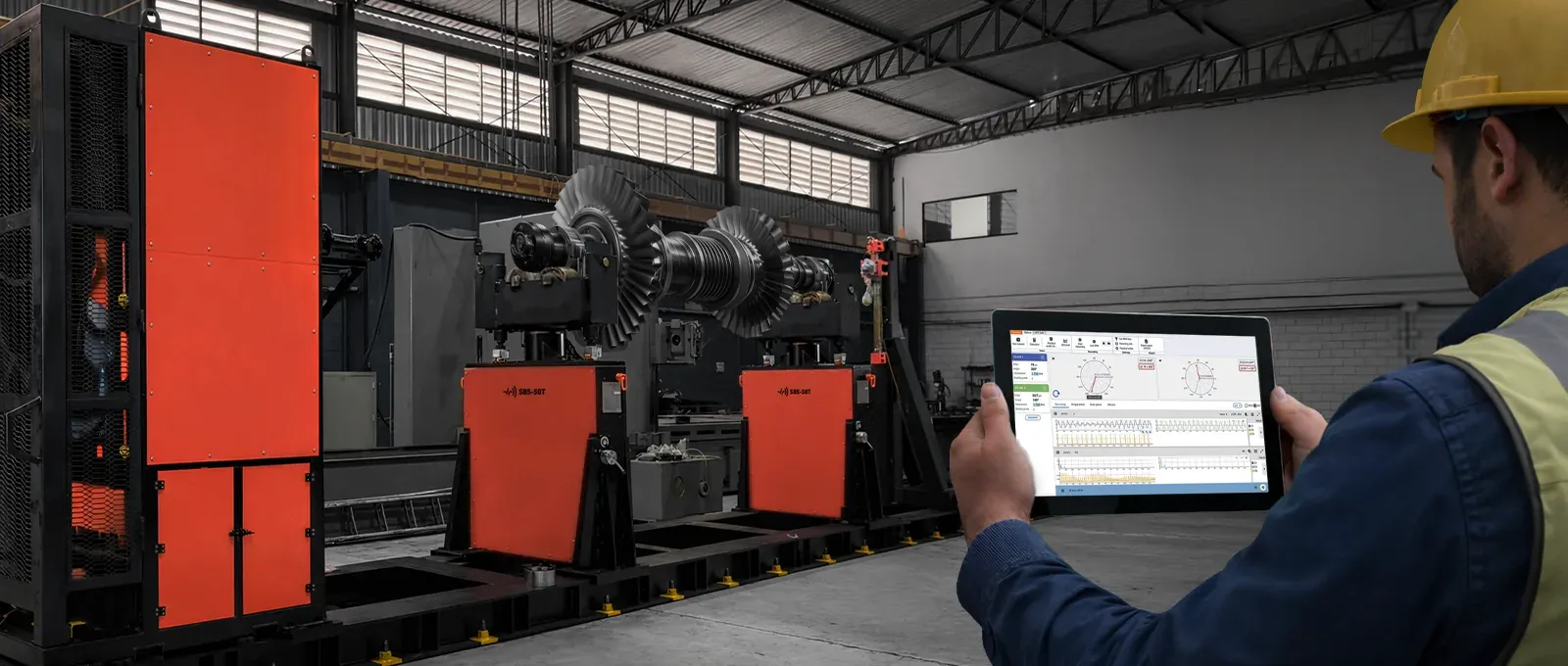
Digivibe MX® 26 Balance is the software that measures the unbalance of a rotor and tells you how much mass to add or remove, and where. It reads the 1X vibration and its phase at each bearing, computes the correction, draws it on the rotor and checks the result against the ISO 21940 grade the rotor requires.
It runs the EI Series soft-bearing balancing machines, and it balances a rotor in its own bearings in the field with the same sensors you use for vibration analysis. Everything lives in a balancing session: the runs, the settings and the report, saved as you go.
-
Record
Spin the rotor and record the initial run. The tachometer gives the speed; the software filters the 1X and reads amplitude and phase on each plane.
-
Get the coefficients
Draw the rotor in the Wizard and skip the trial weight, or put a trial mass and record again. Either way the influence coefficients are now known.
-
Correct
The result is a mass and an angle per plane, drawn on the rotor. Split it between blades, combine it, or convert it to a drilling depth.
-
Tune
Record after the correction. The Tune row refines the result with the same coefficients, without a new trial run.
-
Verify
The residual unbalance is plotted on the ISO 21940-11 chart at the service speed, per plane, against the grade you set.
-
Report
Export an editable Word report with the initial and final state, the corrections and the chart. The session keeps everything for next time.
The whole job on one screen
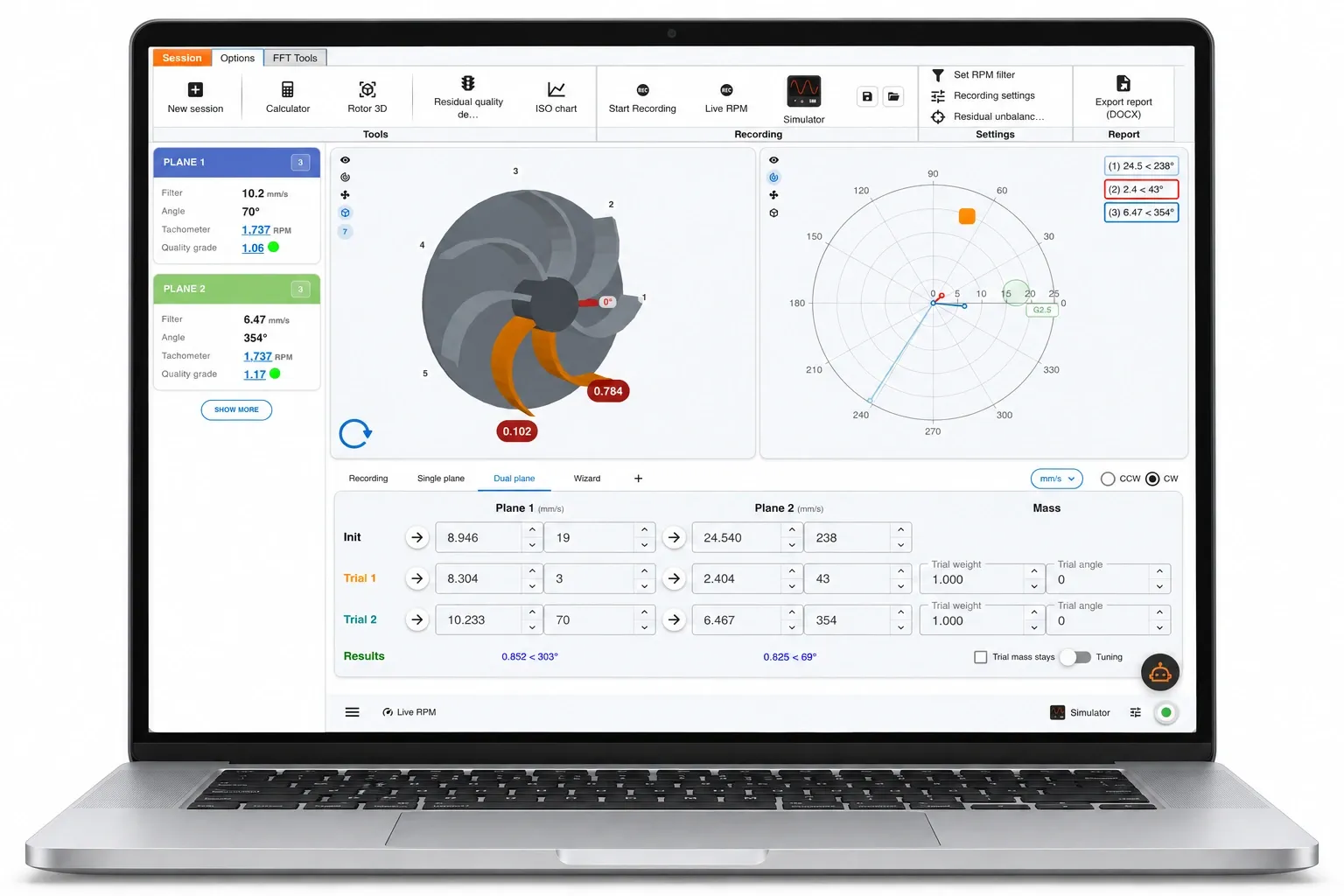
Nothing is hidden in menus. Each plane has its card with the filtered 1X value, its phase, the tachometer speed and the quality grade reached. The rotor is drawn in the middle, the polar plot shows every run as a vector, and the table underneath is where the runs become a correction.
Methods
Five ways to get to the correction
Every method is a tab in the same session, with the same rows: the initial run, the trial runs it needs, a Tune row to refine after correcting, and the result. Pick the tab that matches the rotor and the sensors you have.
✔ available · — not part of the method
| Single plane | Dual plane | Three plane | Wizard | 4-Run | |
|---|---|---|---|---|---|
| What it needs | |||||
| Trial-weight runs | 1 | 2 | 3 | — none | 3, the same mass at 0°, 120° and 240° |
| Tachometer for the phase | ✔ | ✔ | ✔ | ✔ | — amplitude only |
| A drawing of the rotor | — | — | — | ✔ Simple or Advanced editor | — |
| What it gives | |||||
| Correction planes | 1 | 2 | 3 | 1 or 2, from the geometry | 1 |
| Coefficients stored for the next rotor | ✔ | ✔ | ✔ | ✔ in the .eirotor file | — |
| Best for | A rotor with one correction face | Most rotors between two bearings | Long or flexible rotors | A rotor you can draw, on a machine or in the field | A rotor with nowhere for a tachometer |
Three plane and 4-Run start hidden; the plus button next to the tabs brings them back. The Wizard is the only method that needs no trial run.
Two details that save runs. Trial mass stays computes the correction assuming you leave the trial mass on the rotor, so you do not have to take it off. And when a trial run changes the vibration too little to trust, the screen warns you before you build a correction on it.
4-Run: three circles, no tachometer
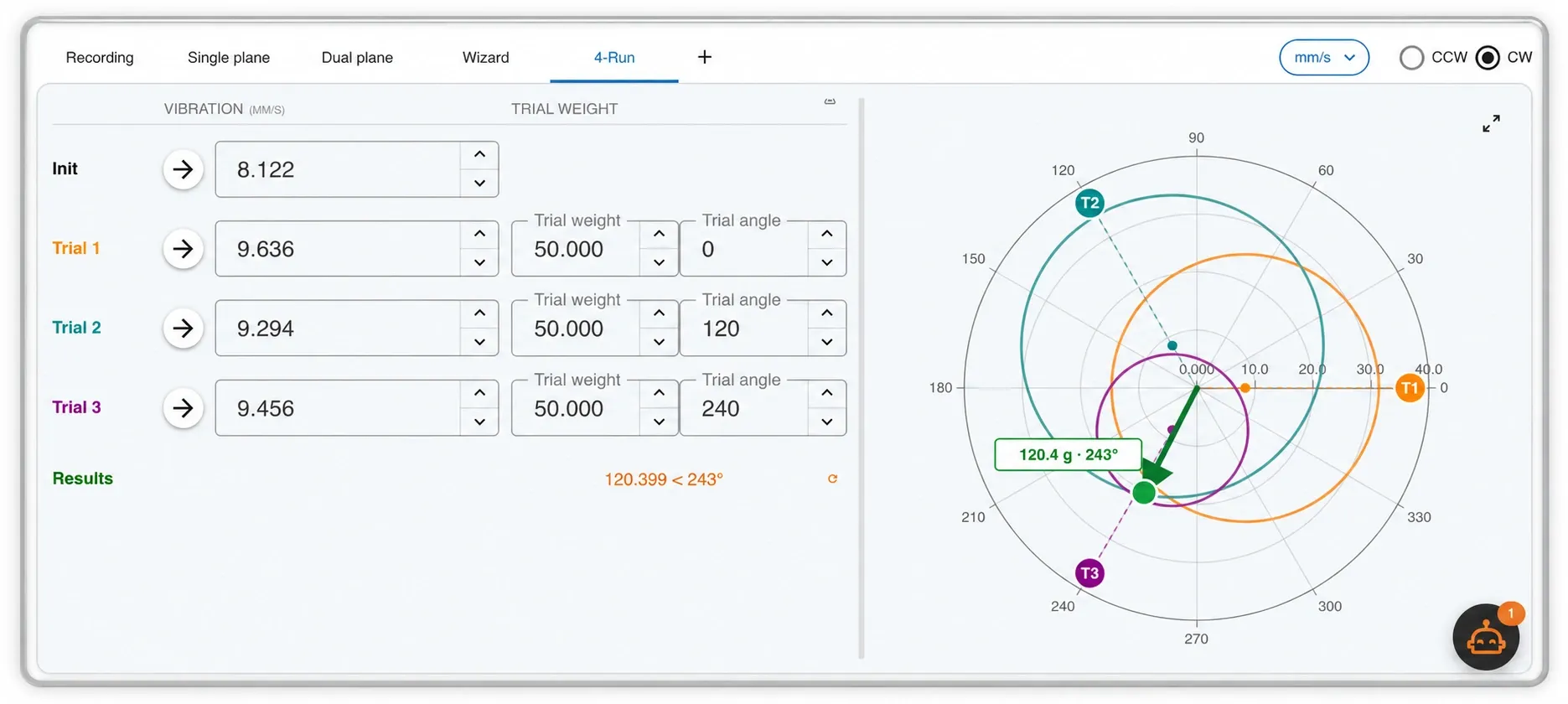
When there is nowhere to fit a tachometer or reflective tape, 4-Run balances with amplitude alone. The same trial mass goes at 0°, 120° and 240°, one run each, and the three circles intersect at the correction. The chart shows the construction, so you can see how well the three runs agree before you trust the answer.
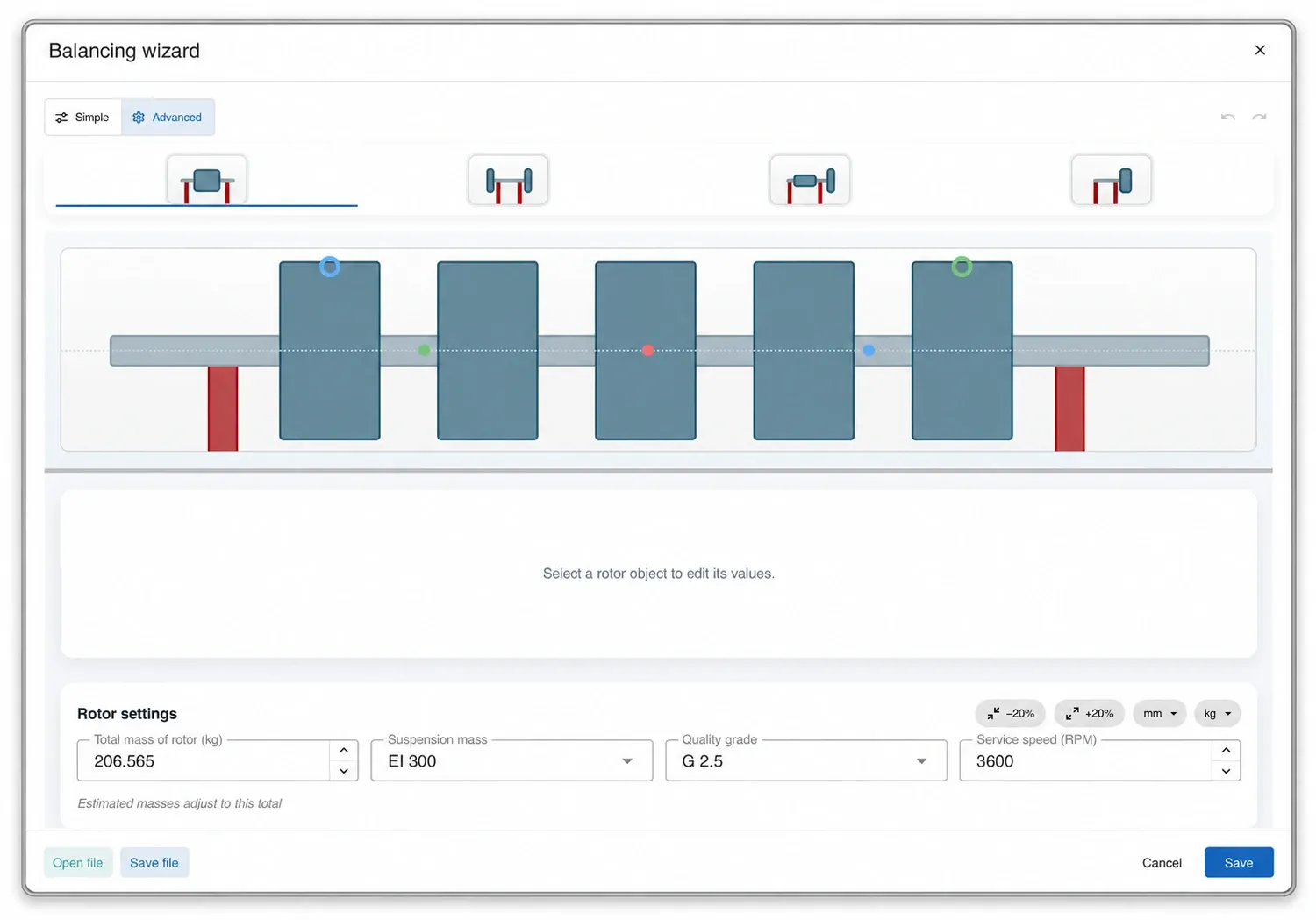
The Wizard: draw the rotor, skip the trial weight
With the Wizard there is no trial run. You draw the rotor, the software works out its influence coefficients from the geometry, and the initial run is the only run before the correction.
Pick one of four layouts, then set the shaft and the discs: the Wizard computes the mass of the shaft, handles different diameters along the rotor, and lets you put the counterweights at any radius, not only on a fixed circle. The Simple editor covers routine jobs; Advanced models the awkward ones. On a balancing machine you also tell it which suspension the rotor sits on.
The drawing is saved as a .eirotor file, so the next rotor of the same type starts from it. Erby can draw it for you from a photo.
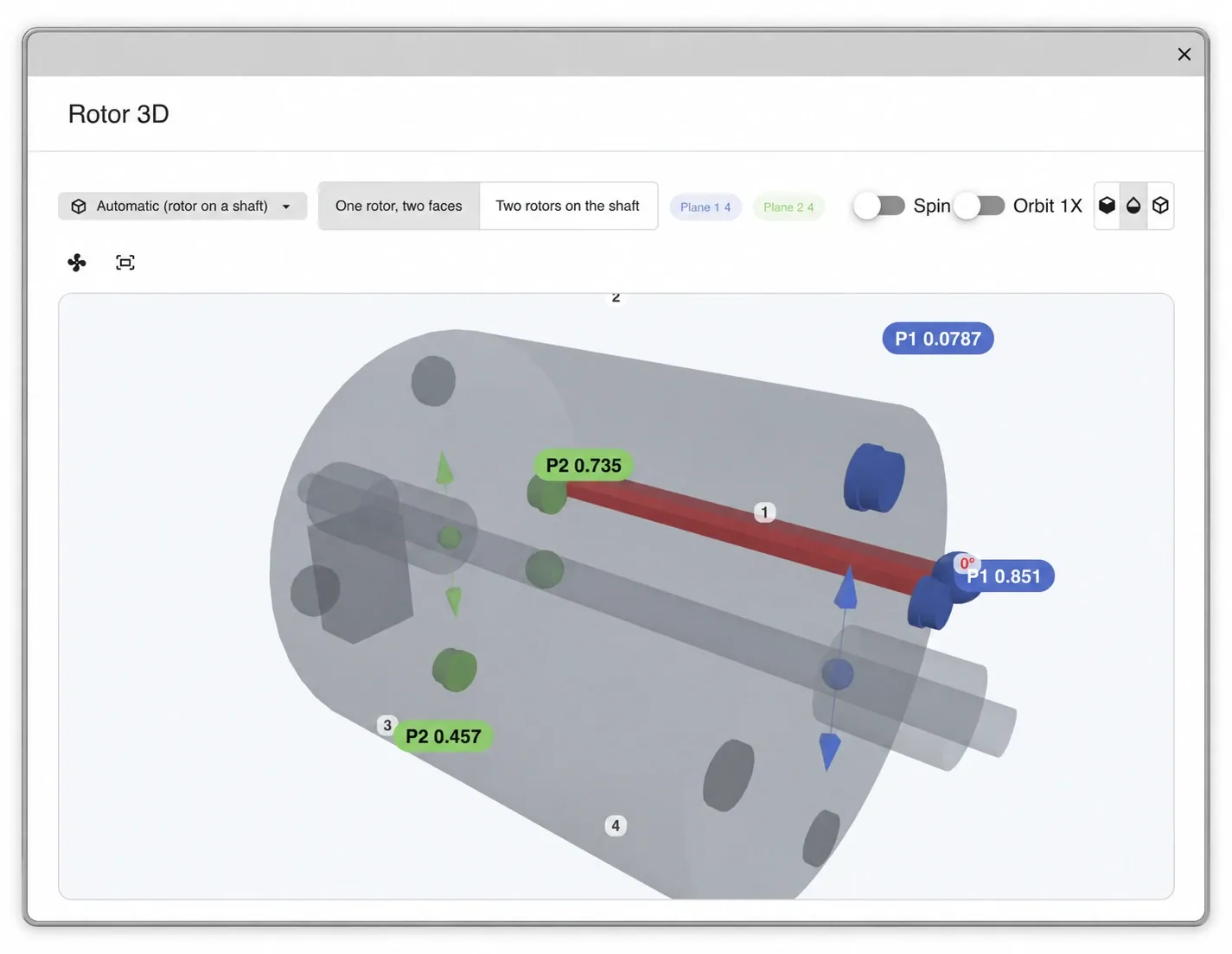
The rotor in three dimensions
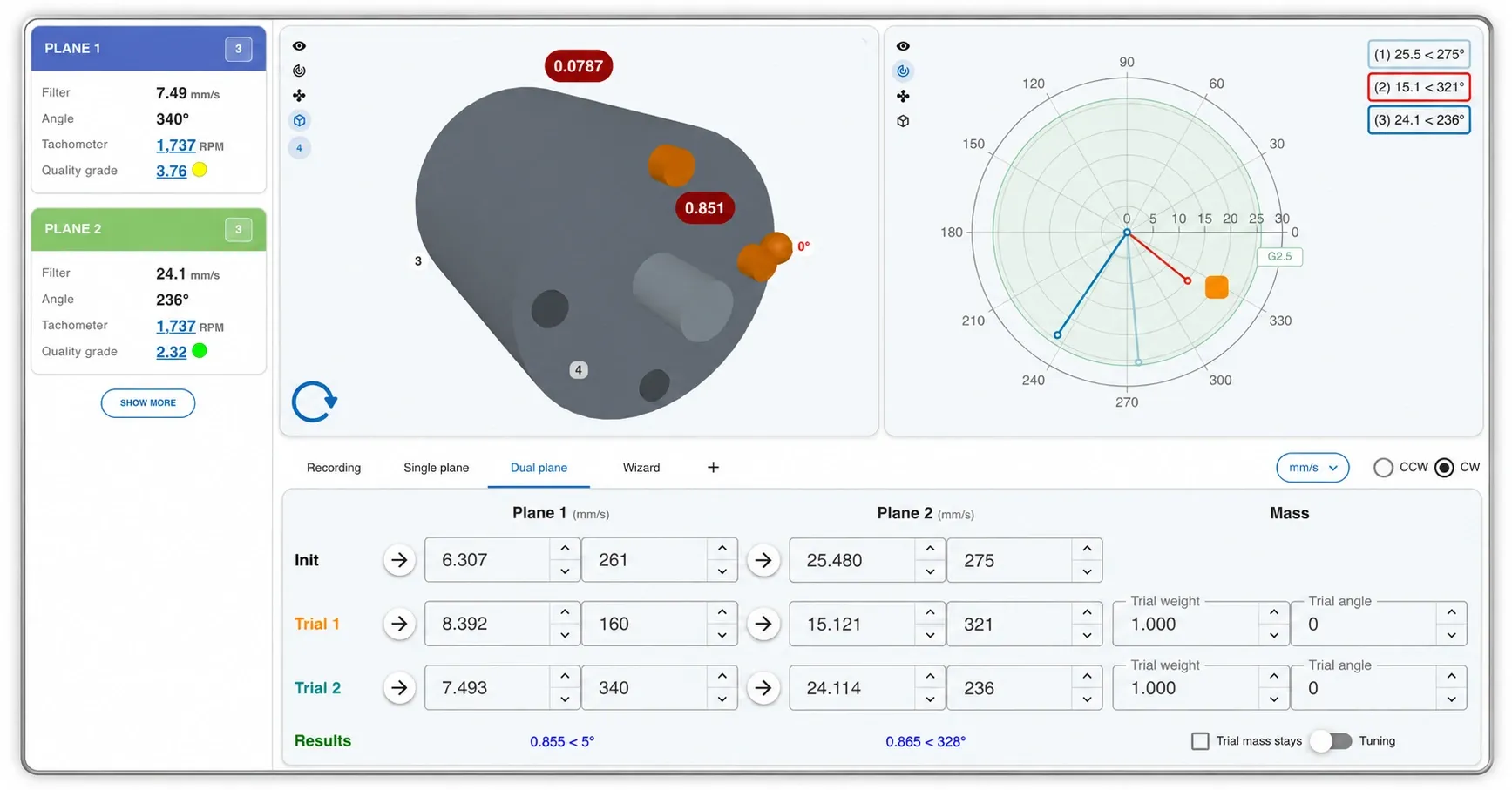
The correction is not a number in a table. Rotor 3D shows the rotor as it is, one rotor with two faces or two rotors on a shaft, with the mass of each plane sitting where it goes and the 0° mark on the shaft so you know where to count from.
Switch on Spin to see it turn, or Orbit 1X to see how the rotor is actually moving at running speed. The same view is on the main screen next to the polar plot, and it goes into the report.
Blades, not degrees
On a fan or an impeller nobody drills at 143°. The blades view splits the correction between the two blades that flank the angle and shows the grams on each one. Set the number of blades, and in 3D pick the blade type: axial fan, radial paddle, curved vane impeller, squirrel cage, hub with clamps or disc with holes. Plane 2 starts with the blades of plane 1, and the report takes whichever view you were using.
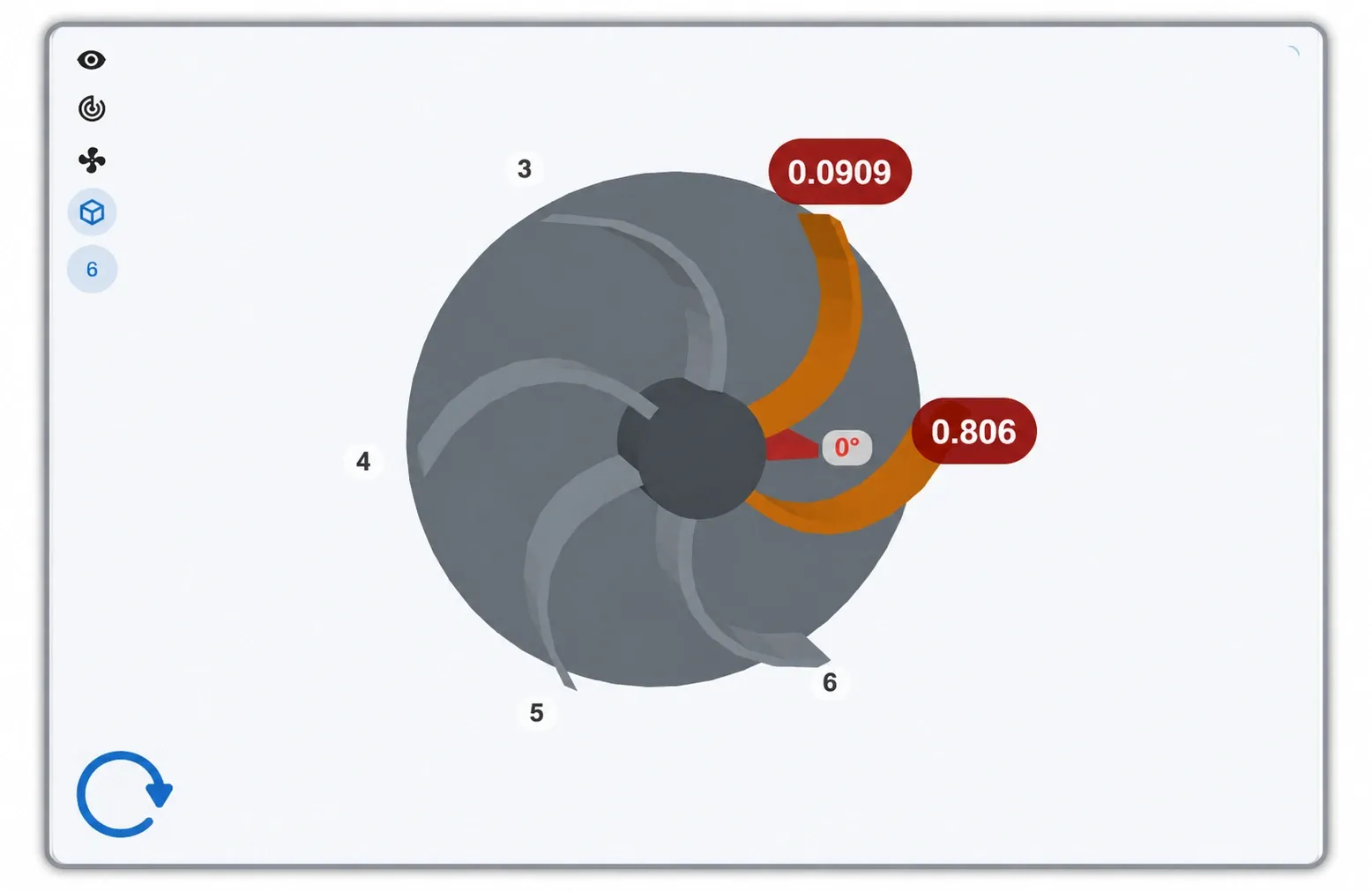
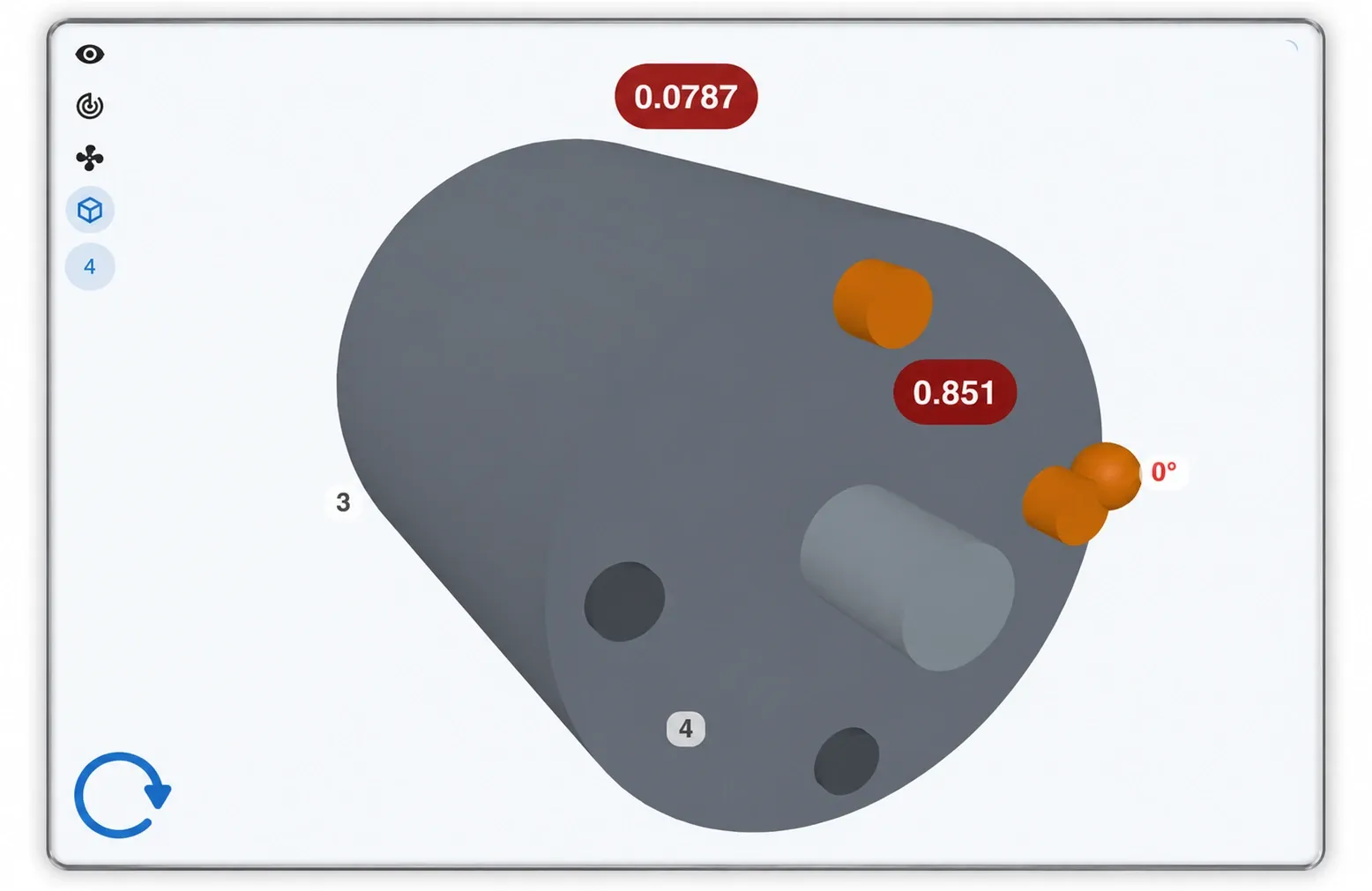
Left, the blades view: one correction, two blades, the grams on each. Right, the 3D view of the same plane: the masses on the rotor, seen from plane 1 with its 0° mark. Both views live on the main screen, in the rail next to the polar plot.
Erby
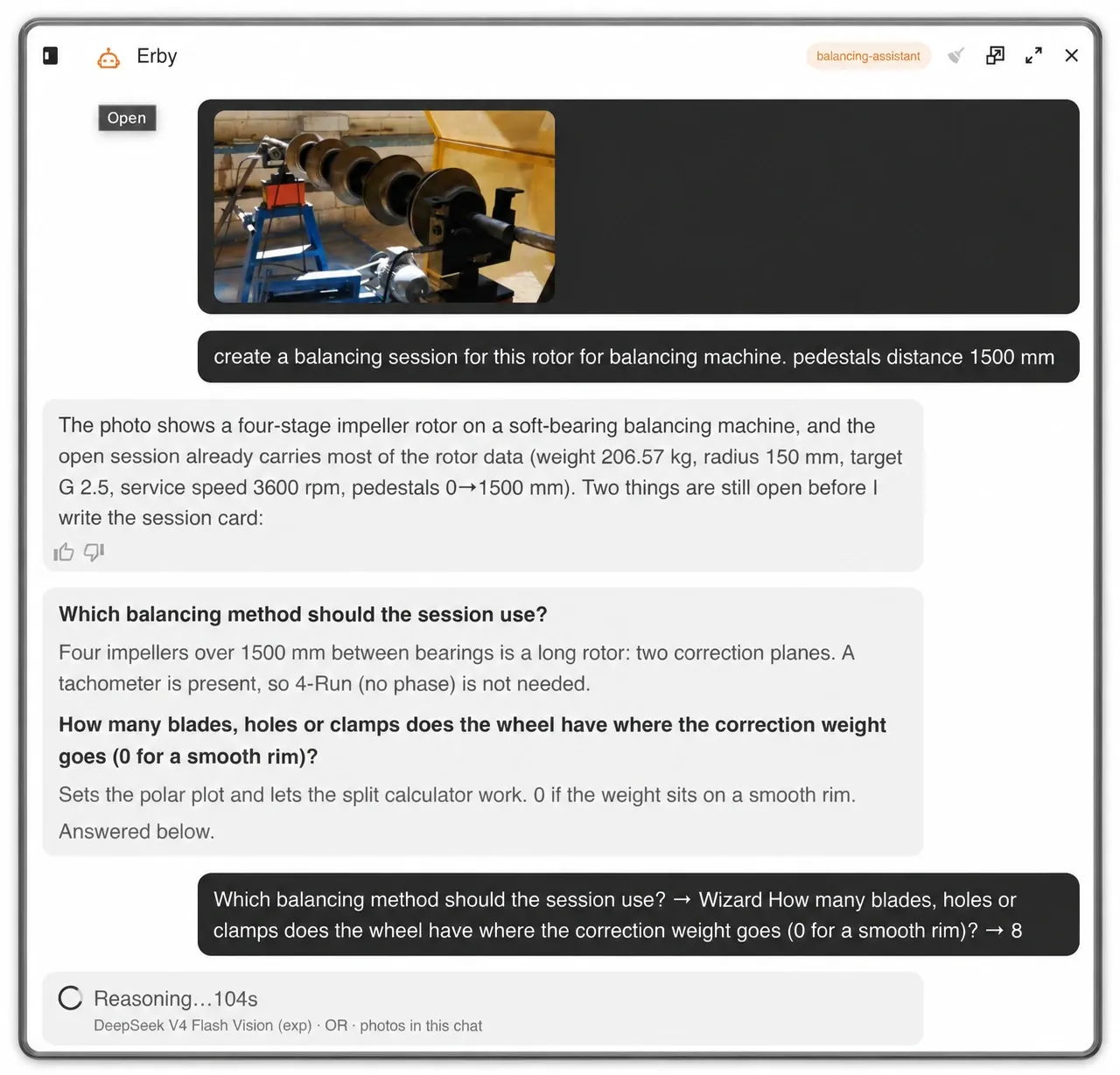
A session from a photo
Show Erby the rotor on the machine and ask for a session. It reads what the open session already knows, the weight, the radius, the grade, the service speed, and asks only for what is still missing, all at once: which method, and how many blades the wheel has. Answer, and it hands you the session with the rotor drawn, the blades set and the target fixed. You review, and you record.
While you work, Erby reads what is on screen: the 1X of each channel, the waveform, and whether the tachometer is seeing one clean pulse per turn. It does not press any button for you; it tells you what it sees.
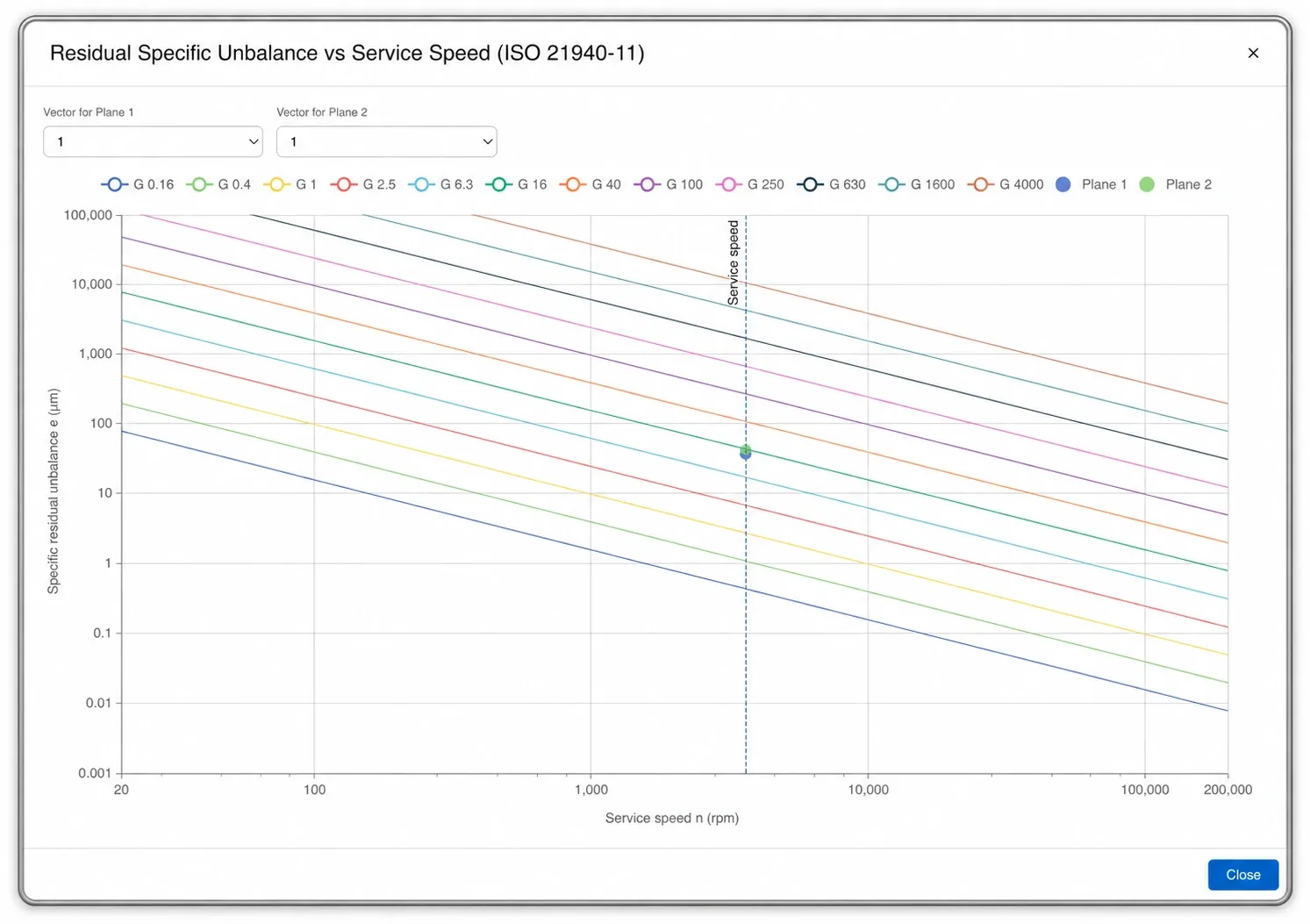
Verified against ISO 21940, per plane
Before the first run you set the rotor weight, the correction radius of each plane, the grade the rotor needs and its service speed, the speed it runs at in the plant, which is the one the tolerance is judged at. The software turns that into the permissible residual unbalance: in total, per plane, as an eccentricity limit and as the equivalent mass at each radius.
After the last run, the residual reached is plotted on the ISO 21940-11 chart at the service speed, one point per plane. Under the line of your grade, the rotor is done.
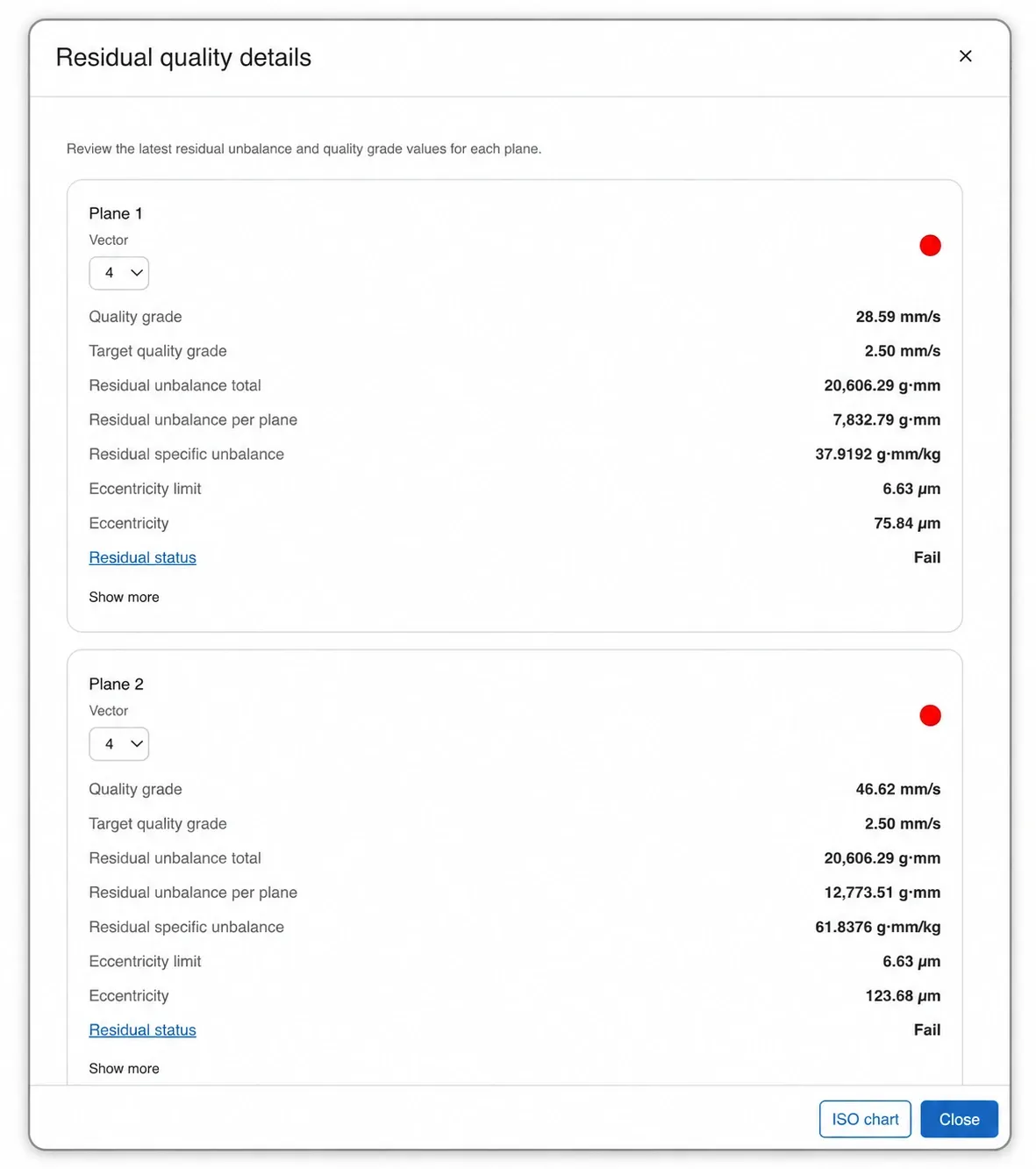
The numbers behind the chart
Residual quality details shows, per plane, what the chart draws: the grade reached against the target, the residual in total and per plane, the specific residual per kilogram, the eccentricity against its limit, and a plain pass or fail. The window opens on the run you choose, so you can check any run of the session, not only the last one.
And it does say fail. The software does not round a rotor into tolerance; it tells you it is not there yet, and by how much.
Recording, with any of our sensors
Pick the device and record: EI WiSER® wireless accelerometers, the GX-400 wired interface, PHANTOM® sensors or a DEFIANT™ for many channels at once. A built-in Simulator generates a signal so you can learn the screen without a machine.
Live RPM shows the speed while the rotor runs, and the RPM filter narrows the tachometer band when the pulse is noisy. Record for a fixed length or until you press stop, with downsampling so an hour of signal does not fill the memory, and watch the spectrum and the vibration vector update as it records. A run from another instrument comes in as an .anl file.
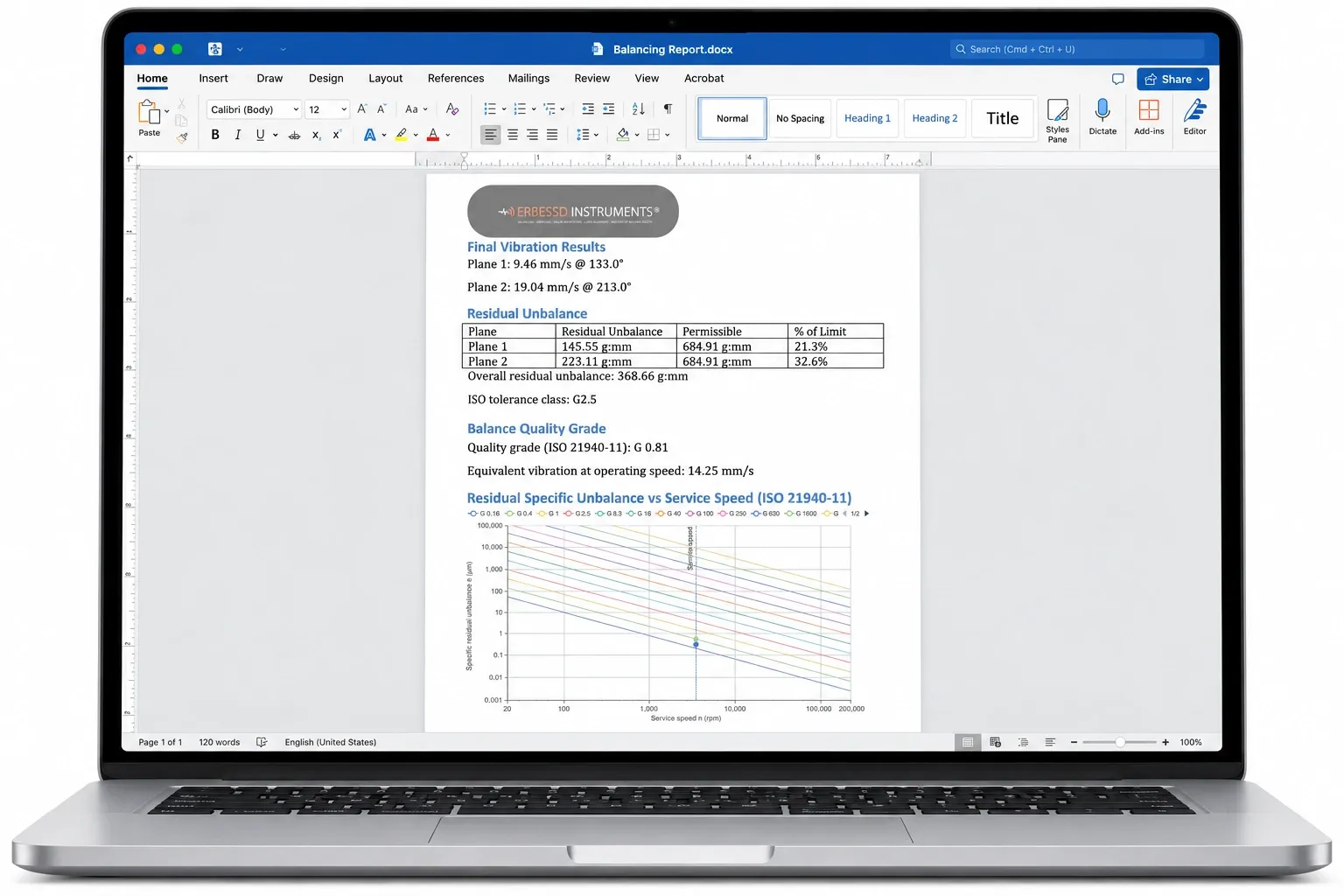
A report you can edit
The report is a Word document, not a locked PDF. It carries the final vibration of each plane, the residual unbalance against the permissible value with its percentage of the limit, the overall residual, the grade reached against the class the rotor required, and the ISO 21940-11 chart with both planes plotted. Add your logo, your photos and your notes, and hand it over.
On a balancing machine the same report certifies the rotor against its grade: on this page, 21.3% and 32.6% of the limit, G 0.81 against a G 2.5 requirement. In the field it documents what was measured, what was added, and where.
Hardware
Runs with every ERBESSD INSTRUMENTS® collector
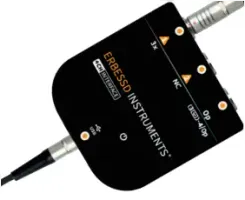
Wired four-channel interface for balancing and analysis on a desktop or laptop, with the tachometer on its own channel.
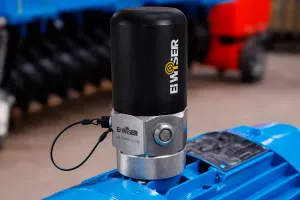
Single-axis wireless accelerometer for cable-free balancing and route collection.

Triaxial wireless accelerometer with three simultaneous channels, for balancing and for the analysis that comes after.
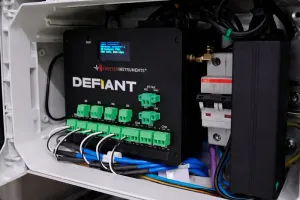
Continuous multi-channel acquisition, for balancing and monitoring on the same machine at the same time.
Digivibe MX® 26 Balance at a glance
| Balancing methods | Single plane, dual plane, three plane, Wizard and 4-Run |
|---|---|
| Trial weights | Not needed with the Wizard, which takes the influence coefficients from the rotor geometry · when trial weights are used, the coefficients are stored and reused on the same or a similar rotor |
| Without a tachometer | 4-Run method, amplitude only — the same trial mass at 0°, 120° and 240° |
| Rotor views | Polar plot per plane · blades view with the correction split between the two flanking blades · 3D rotor with six blade types |
| Rotor wizard | Simple and Advanced editors, four rotor layouts, shaft mass and stepped diameters computed, counterweights at any radius, .eirotor files |
| ISO 21940-11 | Permissible residual unbalance in total and per plane, eccentricity limit, equivalent mass at each radius, quality grade chart from G 0.16 to G 4000 |
| Balancing calculator | Trial mass, split between angles or blades, combine, central mass, drill depth, plate size, radius change and quality grade |
| Acquisition | Simulator, EI WiSER®, GX-400, PHANTOM® and DEFIANT™ |
| Recording | Live RPM, tachometer RPM filter, record until stop, downsampling for long recordings, .anl import |
| Units | mm, cm, m, in, ft · kg, g, lb · mg, g, kg, oz, lb · RPM or Hz · RMS, 0-peak or peak-to-peak · CW or CCW |
| Sessions | Auto-saved folder with the runs, the settings and the report · browse and reopen any session |
| Report | Editable Word document with the initial and final state and the ISO 21940 chart |
| Erby | Draws the rotor from a photo, starts a session from the chat with the method, the rotor and the blades, and reads the recording on screen |
| Included in | Digivibe MX® M10 and M30 |
Frequently asked questions
Do I need a trial weight to balance with Digivibe MX® 26 Balance?
Not with the Wizard. You draw the rotor, the software takes the influence coefficients from its geometry, and the initial run is the only run before the correction. The single, dual and three-plane methods use one trial run per plane, and the coefficients they measure are stored with the session and reused on the same rotor, or a similar one, so the second time there is no trial run either.
Can I balance a rotor without a tachometer?
Yes, with the 4-Run method. It uses amplitude only: the same trial mass at 0°, 120° and 240°, and the construction of three circles gives the correction. It is the method for a rotor where you cannot fit a tachometer or reflective tape.
Which sensors and interfaces can I use?
EI WiSER® wireless accelerometers, the GX-400 wired four-channel interface, PHANTOM® sensors and DEFIANT™ for many channels. The Simulator generates a signal so you can practise without a machine. Runs recorded by another instrument come in as .anl files.
Does it work on a balancing machine and in the field?
Both, with the same session. It is the measuring system of the EI Series soft-bearing balancing machines, and it balances a rotor in its own bearings in the field with the same sensors you use for vibration analysis. The trial-mass calculator has a switch for soft-bearing suspensions, and the Wizard asks which suspension the rotor sits on.
How do I know the rotor meets its ISO 21940 grade?
You set the rotor weight, the correction radii, the grade and the service speed before the first run, and the software shows the permissible residual in total and per plane. After the last run, the residual reached is plotted on the ISO 21940-11 chart at the service speed, one point per plane. Under the line of your grade, the rotor is within tolerance, and the report carries the chart.
What is saved in a session, and can I reopen it?
A session is a folder with the recorded runs, the settings, the rotor drawing and the report, saved automatically as you work. Reopen it from the session browser: the coefficients are still there, so a rotor you balanced before needs no new trial run.
Which version of Digivibe MX® includes balancing?
M10 and M30. M10 is the balancing module with local acquisition; M30 adds routes, automatic diagnosis, modal analysis, ODS and the EI-Analytic™ cloud. Every EI Series balancing machine ships with the module included.